End-to-end DevOps HelloWorld on AWS EKS
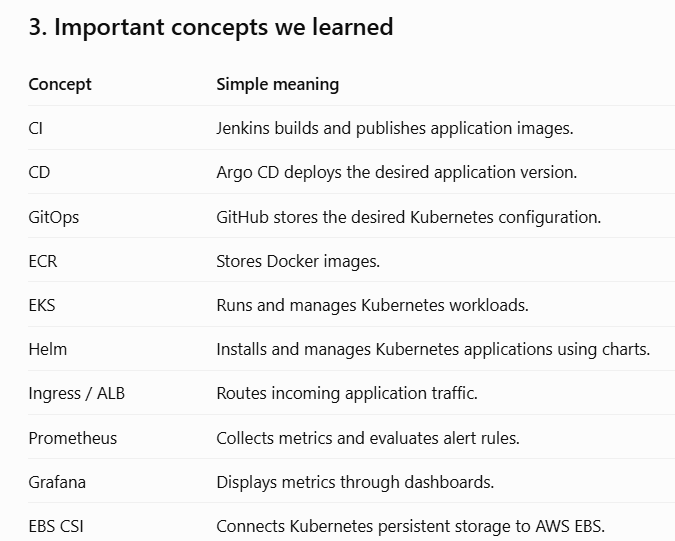
We worked on deploying your HelloWorld application using Jenkins + GitHub + AWS ECR + EKS + Argo CD, and then added monitoring using Prometheus and Grafana.
Here are simple notes you can keep for revision and interview preparation.
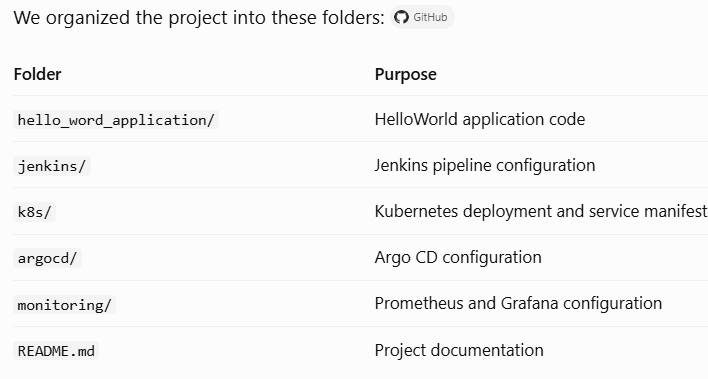
- Repository structure
Your GitHub repository:
deployment_simple_application (git hub Repo)
2. Step-by-step: What we did

Step 1 — Created AWS EKS infrastructure
Created the EKS cluster
EksHelloWordineu-north-1.Used Kubernetes version 1.34.9.
Configured two worker nodes.
Checked node and cluster status using
kubectl.

Step 2 — Containerized the application
Worked with the HelloWorld application.
Created a Docker image.
Used AWS ECR to store the image.
Used a versioned image tag so deployments can use specific versions.

Step 3 — Configured Jenkins CI pipeline
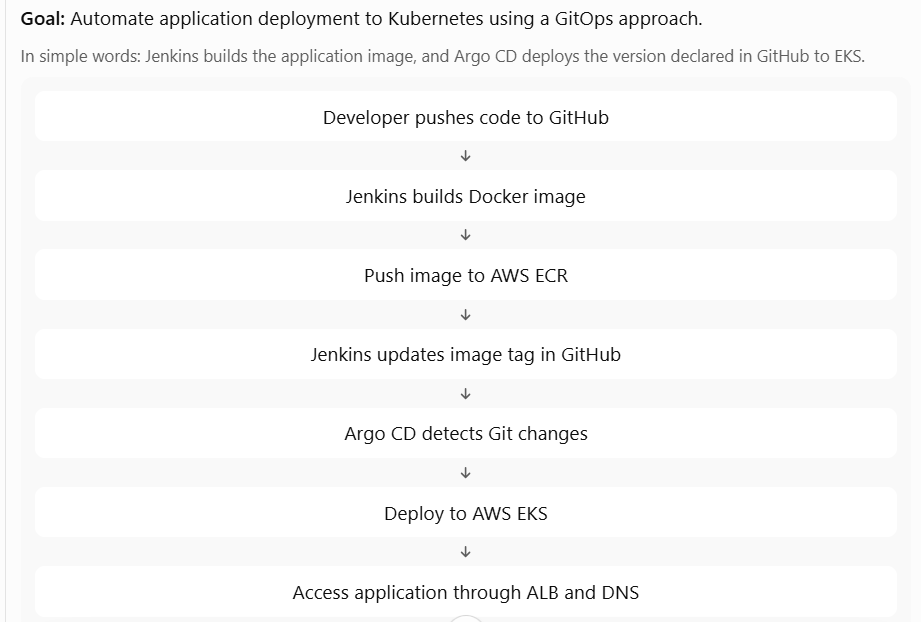
We designed the Jenkins pipeline to automate the build and image publishing process.
Get the application code.
Build the Docker image.
Tag it using the Jenkins build number.
Authenticate with AWS ECR.
Push the image to ECR.
Update the image tag in
k8s/deployment.yaml.Commit and push the updated manifest to GitHub.
Important: Jenkins updates Git; it does not directly deploy using kubectl apply.

Step 4 — Configured Argo CD for GitOps
Installed Argo CD using Helm.
Connected Argo CD to your GitHub repository.
Created the application
helloword-argocd.Configured it to track the
mainbranch andk8s/directory.Enabled automated sync, pruning, and self-healing.
Configured namespace creation.
Argo CD continuously compares Git with the live Kubernetes resources and reconciles differences.

Step 5 — Deployed the application to Kubernetes
Created the
hellowordnamespace.Created a Deployment named
helloword.Configured two application replicas.
Exposed the application on container port 5000.
Created a Service named
helloword-svc.
This allowed Kubernetes to manage the application pods and distribute traffic to them.

Step 6 — Configured external application access
We worked on the networking path to access the application.
Configured AWS Load Balancer Controller and ALB Ingress.
Used ALB IP target mode to route traffic to Kubernetes pods.
Configured the application hostname
app.helloword.internal.Used Route 53 private hosted zone
helloword.internal.Troubleshot the earlier LoadBalancer/NLB target health issue and moved to the ALB Ingress access approach.
This made the application accessible through its configured internal domain.

Step 7 — Added monitoring
Installed
kube-prometheus-stackusing Helm.Configured Prometheus and Grafana.
Added Grafana dashboards for Kubernetes monitoring.
Configured persistent storage for Grafana and Prometheus.
Created a custom
PrometheusRule.Worked on Alertmanager email notifications.
We also investigated monitoring alerts and Grafana pod scheduling issues.

Step 8 — Configured persistent storage
Installed the AWS EBS CSI driver add-on.
Configured EKS Pod Identity for the EBS CSI controller.
Attached the
AmazonEBSCSIDriverPolicyto its IAM role.Created a
gp3StorageClass.Tested persistent volume provisioning with a PVC.
This enabled Kubernetes workloads to request persistent EBS storage.